Wednesday, August 19, 2020

Tips for passing Salesforce JavaScript Developer Certification

Motivation behind this

Since Salesforce introduces Lightning Web components the code standard and way of doing things changed in Salesforce arena, With the help of readily available out of the box components and the power of modern web stack development  it is essential that Salesforce developers must gain proficiency in modern JavaScript.

JavaScript is not  new in Salesforce but how it will be used now is different. So I thought to test my skills with this examination.

Exam outline : This exam is similar like PDII. You need to complete an online exam and need to complete a super badge in trailhead

Pro tips 

Complete the trail at trailhead from here

Clear your doubts about querySelector 

  1. https://developer.mozilla.org/en-US/docs/Web/API/Element/querySelector
Clear your doubts about modern JavaScript syntax and methods 
  1. https://developer.mozilla.org/en-US/docs/Web/JavaScript/Reference/Operators/Spread_syntax
  2. https://developer.mozilla.org/en-US/docs/Web/JavaScript/Reference/Functions/Arrow_functions
  3. https://developer.mozilla.org/en-US/docs/Web/JavaScript/Reference/Classes/constructor
  4. https://developer.mozilla.org/en-US/docs/Web/JavaScript/Inheritance_and_the_prototype_chain
  5. https://developer.mozilla.org/en-US/docs/Web/JavaScript/Reference#Control_flow
Understand the execution order

Check for the console methods and debugging JavaScript 

Difference between const,let and var 


Tuesday, May 12, 2020

Custom Toast message in LWC

Hello All,

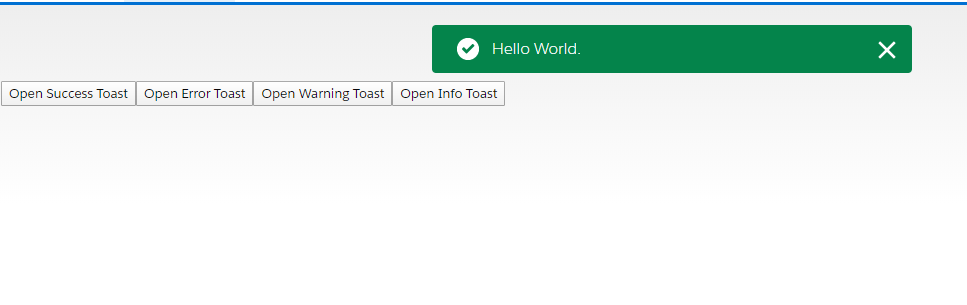
You might be aware that there are certain events like toast message only works in lightning context. Which means they do not work when invoking from a Visualforce page or a custom APP.

Recently I have faced a similar roadblock where my toast messages were not showing as I wrapped my LWC component inside an AURA application.

You can find my git project here.

I have also added a sample component to show how to use the custom toast component. If you have any comments or want to add some improvement, please let me know.


Tuesday, July 9, 2019

playing with force:inputField - addressing rendering issue and hiding new option from the look up drop down

As we know we do have a limitation on lookup fields in lightning components and if we don't want to go for custom component force:inputFueld is one option.

We have 2 very core limitation on that 

1. Conditional rendering of the field 
2. Hiding the new action

To resolve the #1 wrap force:inputField with <aura:renderIf > instead of aura:if so that revaluation of the rendering logic happen again


To address #2 we need a CSS trick, please add below CSS to your component to hide the New Record option as it does not obey the action override. 

.THIS.createNew{
    display : none !important;
}

Thursday, May 23, 2019

force:showToast Message Display In Multiple Lines In Salesforce Lightning Component

force:showToast Message Display In Multiple Lines In Salesforce Lightning Component


Dear Devs,

Today in this post I am going to share a workaround for salesforce lightning force:showToast event to display toast message in multiple lines. without any custom code. 


I will be using the power of aura:html tag to do that append this to your lightning component 

<aura:html tag="style">.toastMessage.forceActionsText{
white-space : pre-line !important;
}</aura:html>
Add this to your helper js file.
showToast: function (message) {
var toastEvent = $A.get("e.force:showToast");
toastEvent.setParams({
"title": "Action not allowed!",
"message": message,
"type" : "error",
"mode" : "sticky"
});
toastEvent.fire();
},

Not the controller or any other helper method invoke the show mesage method
myfun : function(component,event,helper){
var errMessage = "This is my first error message. \n" ;
errMessage += "This is my senond error message. \n" ;
errMessage += "This is my third error message. \n" ;
helper.showToast(errMessage);
}
The message will appar like above and no custom component is needed to achive that.
Hope this will save your time


Friday, November 10, 2017

Get report on object permission

We don't have any standard way to get a report on profile permission on the different object in a single go. In Salesforce, all access is given via a permission set so if you query on permission set assignment you can see who is assigned to what permission set.

In Salesforce, we have an object called ObjectPermission which has a direct relation with Permissionset

If you query on object permission you will set all the object permission in a single go.

Below query will provide you the matrix to get the object permissions based on profile 

SELECT Parent.Profile.Name, SobjectType, PermissionsCreate, PermissionsRead, PermissionsEdit, 
                       PermissionsDelete, PermissionsViewAllRecords, PermissionsModifyAllRecords 

                       FROM ObjectPermissions where Parent.Profile.Name <> NULL


You might have looked at the query filter and observed that I am using Parent.Profile.Name <> NULL I have used it because it will escape all the permission not provided by the profile like given by Permission set to the user. 


The code can be found here or the unmanaged package from here. It will look like below. I have given two tabular formats to view the data you can use as per your need.


The same can be done with FieldPermissions object to get the report on the FLS. You can also use the AssigneId of PermissionAssignment to identify all the access of an user.


Wednesday, May 10, 2017

PAGEREFERENCE BEST PRACTICE

In one of my previous post I told how to redirect to standard salesforce classic and why. To give you the recap .

// ================ This is not recommended ===========
public PageReference customsave() {
    try{
        insert acct;
    } catch (DMLException e) {
        /*do stuff here*/
    }
    PageReference acctPage = new PageReference ('/' + acct.id};
    acctPage.setRedirect(true);
    return acctPage;
}

//========== Recommended way is =======

public PageReference customsave() {
    insert acct; //Error handling removed for brevity. ALWAYS try/catch!
    ApexPages.StandardController sc = new ApexPages.StandardController(acct);
    PageReference acctPage = sc.view();
    acctPage.setRedirect(true);
    return acctPage;
}

In salesforce we have a critical update ticking for another issue where we return the visualforce page reference.
Now it has two security restriction.

  1. With HYPERLINK see here
  2. Returning /apex/page as page reference, Require CSRF Protection on GET requests
When this option is enabled for a Visualforce page, you can’t access that page by entering its URL—/apex/PageName—and plain links to that page using <a> tags don’t work.
Plain links from a page with CSRF checks work, but links to the page do not. For example, if your page has the name PageName, the link <a href="/apex/PageName">Link</a> doesn’t work. Instead, use the URLFOR() formula function, the $Page global variable, or the apex:outputLink component.
<apex:outputLink value="/apex/PageName">Link using apex:outputlink</apex:outputlink>
<a href="{!$Page.PageName}">Link using $Page</a>
<a href="{!URLFOR($Page.PageName)}">Link using URLFOR()</a>
CSRF checks on GET requests also affect how Visualforce pages are referenced from Apex controllers. Methods that return the URL of CSRF-protected pages for the purpose of navigation don’t work:
public String getPage(){
  return '/apex/PageName'; 
}
Instead, use methods that return a reference to the Visualforce page instead of the URL directly.

public class customController {
    public PageReference getPage() {
    return new PageReference('/apex/PageName'); 
  }

  public PageReference getPage1() {
    return Page.PageName; 
  }
}


When you use one of these methods to link to a page, Visualforce adds the required CSRF token to the URL. These are the preferred methods for linking to Visualforce pages, regardless of whether CSRF protection is enabled for the page. These are the only methods available for adding a CSRF token to a URL for a Visualforce page.

Friday, May 5, 2017

Passed DEV 501 transition EXAM !!!!!!!!!!!!

I kept postponing the exam and finally took it on Apr 18, 2017, passed it without any issue.
Anyways if you are planning to take this exam, I would suggest that you take it at the earliest as the transition exam is not that difficult if you know what to study. 
A few other folks mentioned that the actual study guide is a bit unhelpful which I tend to agree with that. With every new release, it will become more complex to pass in single attempt. 


STUDY TOPICS:
  1. Compound fields – Learn the different types of compound fields and understand the considerations and limitations. Pay attention to DISTANCE and GEOLOCATION formulas. 
  2. Advanced Currency Management – review this topic and also pay attention to how you would approach this in SOQL or SOSL. 
  3. How would you manage exchange rates when multi-currency is enabled?
  4. Understand Continuation Calls and why they are needed.
  5. Review best practices for test classes and why the new @testsetup annotation is used. Understand its considerations. 
  6. Review how to query for permission sets in SOQL. Pay close attention to the various aspects of this namely the relationship between the user and permission set and the user license.
  7. Understand the @invocablemethod annotation and how it differs from Process.plugin and the @invocablevariable annotation.
  8. Understand the basics of lighting components. Best to skim through the Lightning components developer guide and understand the first few chapters. 
  9. Pay attention to how you would mock classes for HTTP callouts v/s web service callouts?
  10. Review the web service class and understand what kind of arguments it can accept and return. 
  11. Visualforce best practices
  12. APEX best practices
  13. Order of Execution
  14. Understand how to use the developer console and its components. How can you debug your code using this? (Spend some time on this. I missed some questions on this and they are easy to get!!!!)
  15. Apex charts – Pay attention to the various options and attributes. 
  16. Efficient ways of querying parent-child object SOQL or performing parent-child object DML. 
  17. Roll-up summary considerations.
  18. Know when to pick the best automation tool for a given scenario. 
  19. Review the VF apex: action… tags and understand their usage. 
  20. Finally, skim through the apex and vf developer guides. Note: I was not able to do this in detail due to lack of time but if you have time then go for it. 
Overall if you know the above topics and reviewed the study guide you should pass quite easily.
Good luck and as always, you are free to ask me questions in the comments. 
Here is the link you can get all the information about the topic. please leave your comment I will try to respond as much as I can.

Wish you all the best and thanks for visiting my blog. 


Tips on passing Salesforce AI Associate Certification

  🌟 Motivation to Pursue the Salesforce AI Associate Certification 🌟 The world of technology is in a state of perpetual evolution, and on...